If you have adopted Microsoft 365, you likely have one or more SharePoint super users. These individuals generally hold all the keys to optimizing your teams’ productivity and collaboration within your organization, while also owning one or more SharePoint sites. In 2026, the challenge for your super users has intensified with the massive integration of artificial intelligence into the Microsoft 365 environment—particularly with Copilot Agents, which can now perform direct actions on SharePoint content and interact with document workspaces.
Super users must now master not only traditional SharePoint features, but also understand how AI is transforming search, content management, and collaboration. With the arrival of features such as SharePoint Advanced Management and its Content Management Assessment (CMA) tools, along with new automated governance capabilities, the role of super users is evolving toward a more strategic approach to data management.
In 2026, SharePoint is more tightly integrated than ever with Teams, OneDrive, and new mobile tools, enabling employees to access information primarily via mobile devices. Super users must therefore understand these new usage dynamics and know how to structure content with optimized metadata to fully leverage Microsoft 365’s AI-powered search capabilities.
Without further delay, let’s explore in this article the various aspects of advanced SharePoint training tailored to the realities of 2026, in order to determine whether it could meet your current and future needs.
Who is advanced SharePoint training for?
Advanced SharePoint training focuses on in-depth SharePoint features to enable efficient and structured management of information and documents. In 2026, this training now incorporates the latest artificial intelligence innovations, including Microsoft 365 Copilot and SharePoint conversational agents, which are revolutionizing search and content management.
The training covers advanced site creation and customization, the configuration of AI-optimized document libraries, intelligent document management using the new SharePoint Advanced Management features, and process automation through Copilot-enhanced workflows. Participants also learn how to structure metadata to maximize Copilot’s natural language search capabilities and how to configure automated compliance alerts.
What’s new in 2026 includes:
Native integration of Copilot Agents for conversational assistance
Advanced natural language queries for intuitive search
Automatic synchronization of Teams meeting notes with SharePoint
Automated governance and content management assessment tools
Optimization for mobile access and field collaboration
Unlike SharePoint end-user training, which targets a broader audience and focuses on day-to-day platform usage, this advanced training emphasizes mastery of AI-driven features, optimization of document libraries for Copilot, and the configuration of SharePoint environments tailored to each organization’s specific needs—while preparing the ecosystem for future Microsoft 365 innovations.
Why take Advanced SharePoint Training
Any organization looking to embrace digital transformation and better structure its internal environment should invest in the right tools to track progress and build a solid foundation. To achieve this, many companies turn to Microsoft 365 to benefit from powerful, high-performance collaboration tools. As a result, they gain access to an integrated SharePoint environment connected with OneDrive—ready to be shaped according to the organization’s specific needs.
To implement and manage a modern SharePoint environment in 2026, best practices have evolved with the integration of artificial intelligence and new automated governance tools. It is now recommended to appoint 1 to 3 people per department, depending on the size of the organization and the complexity of its document management needs. This increase reflects the need to master Copilot features, AI-driven metadata management, and the new capabilities available through SharePoint Advanced Management.
The goal is for each department to have at least one person with the expertise to actively manage and evolve its SharePoint environment, as well as someone capable of configuring conversational agents and optimizing the document structure for natural language queries.
MS Solutions’ recommendation:
To ensure business continuity and fully leverage the new 2026 features, we recommend that all our clients train 2 to 3 people per department. This ensures coverage in case one person leaves the organization or is temporarily unavailable. It also allows responsibilities to be distributed between traditional SharePoint administration and the new AI- and automation-related competencies.
The typical training path
As mentioned above, to be relevant, a SharePoint training must include a theoretical part and an application part.
Our SharePoint training for administrators and developers is divided into 5 main modules as follows:
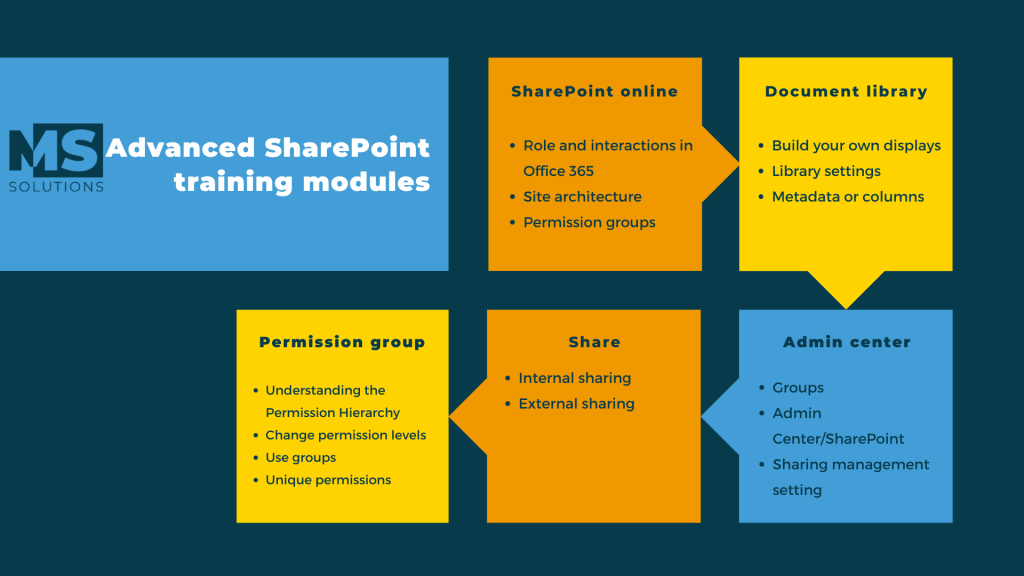
For the theoretical part, we lay the foundations by explaining the main concepts of SharePoint, the particularities and functionalities.
For the application part, we reflect together on how to build your environment with precision so that it reflects your structure while sharing with you the best IT practices so that you have all the keys in hand for an optimized SharePoint!
In short
To be effective while being secure, the structure and privacy policies of your SharePoint environment must be carefully considered.
As your organization evolves, it is essential to have internal resources who are able to understand the workings and particularities of your SharePoint environment in order to be able to evolve it so that it is always relevant for your organization.
For this reason, advanced SharePoint training is ideal for training your resource people so that you have the autonomy required to bring your tools to life and make them sustainable!
If you would like to learn more about the SharePoint administrator or developers training offered by MS Solutions, contact our experts to discuss your needs and concerns.